


Navigation Web3: A Survival Guide for Your Crypto Wallet So, you've decided to step beyond the familiar shores of the traditional internet (Web2) and into the wide-open ocean of Web3. Exciting, right? Total digital ownership, decentralized apps (dApps)—it's the frontier. But, just like any frontier, it’s got its own set of dangers. If you don't know the ropes, you're a target. My core philosophy for Web3 safety can be summed up simply: Your wallet is your key; treat it like it’s your home and bank account combined. Every interaction, especially "connecting and signing" your wallet to a new site, is like opening your front door. You wouldn't open your door to a total stranger with a clipboard, so don't do it in crypto. Know Before You Click "Connect" Before you connect your wallet (often via extensions like MetaMask), stop and think. Connecting only gives a site your public address, but the dangerous part is the signature request. Scam sites love to trick you. They’ll prompt a signature for one thing (like "login") while actually seeking a transaction approval to drain your funds. Read every message pop-up in your wallet before you approve it. Spotting the Scammers Checking a project's legitimacy before interacting is your biggest shield. It's not foolproof, but looking for common red flags saves you: Anonymous Teams: Who are they? Anonymous devs aren't necessarily scammers, but with zero reputation, there’s no accountability. Fully "doxxed" (public) teams are a much better sign. Copied Websites: Scammers are lazy. Is the URL slightly wrong? Does the "About Us" sound fishy? It might be a phishing clone. Fake Urgency: "MINT NOW BEFORE WE SELL OUT IN 5 MIN!" This is a huge, screaming red flag. Real opportunities give you time to breathe. Too-Good-To-Be-True Rewards: No one is going to give you free crypto for nothing. If a "project" promises guaranteed 10x returns or massive "airdrops" that require an upfront fee, it's a scam. Enter The Burner Wallet The single best way to protect your main holdings is by using a burner wallet. Think of it as a disposable wallet you use for interactions you don't 100% trust. How it works: Create: Go to your wallet app (e.g., MetaMask) and simply create a "New Account." Give it a name like "Burner Wallet." This is a completely separate address. Fund: Transfer only the specific amount of crypto (e.g., ETH for gas fees + a small amount for a mint) from your "Main Wallet" to this new burner address. Use: When interacting with a new, less-than-verified dApp, always use this burner wallet. If you get scammed, they only get the small amount inside it, not your life savings. It’s that simple, yet it's your ultimate safety net. The Forgotten Door: Token Approvals Finally, let's talk about the danger that lingers after you’ve finished. When you interact with a legitimate dApp, like a decentralized exchange (DEX), you often give it permission (an "approval") to spend a certain amount of your tokens to make swaps easier. The catch? Many sites set these approvals to unlimited. Years ago, giving an approval to a now-abandoned dApp might seem fine. But if that dApp gets hacked today, the hacker can use that old approval to pull tokens from your wallet. It's like leaving your front door unlocked. You must regularly revoke old approvals. This is one of the most neglected security habits in crypto. You can use trusted tools like Etherscan’s Token Approval tool or Revoke.cash. Once you're done with a dApp, go in and revoke any active approvals. Think of it like checking your door is locked before you go to sleep. It’s boring but necessary. The world of Web3 is incredible, but its freedom requires self-responsibility. Take 30 seconds more on every transaction. Create a burner wallet today. Revoke your old permissions. Stay safe out there
Conversation
Join the conversation
Share your thoughts with the author and other readers.
Comments0
Checking your account…
Related blogs
Why WURK.fun Should Add a "Delete Submission" Feature
WURK.fun has quickly become one of the most exciting micro job marketplaces on Solana. Whether you're completing quick social tasks, entering meme contests, or submitting custom creative work, the platform makes it easy for humans and AI ag


I Don’t Want You Getting Rekt: The No-BS Guide to Web3 Wallet Security
Getting paid in crypto feels like magic, until a bad click wipes your balance. In Web3, you are the bank. Check out our no-BS guide to burner wallets, revoking approvals, and securing your hard-earned bags.

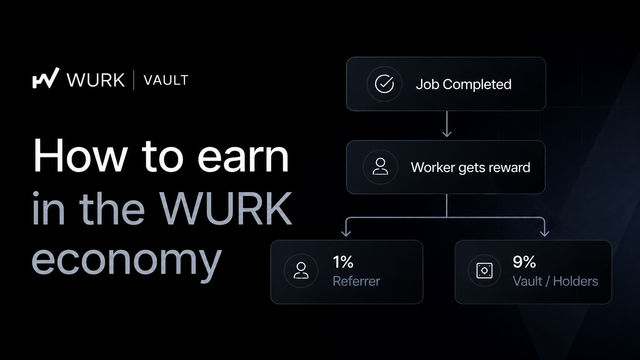
How to Earn Rewards as a Holder
The WURK Vault rewards active holders through real platform activity, not token inflation. Every completed job contributes back into the ecosystem, creating sustainable rewards. WURK on Solana.
Latest comments
0