


Web3 Survival Guide: How to Protect Your Crypto, Spot Scams, and Master Wallet Security
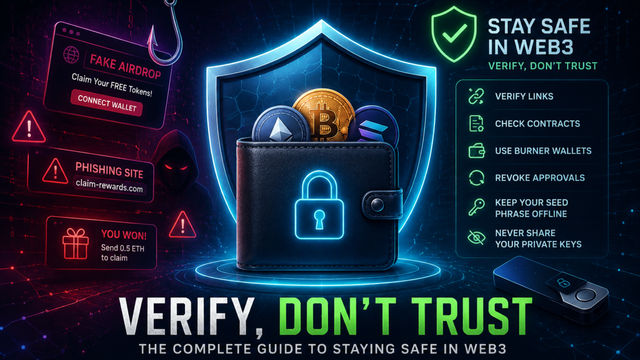
In Web3, you are your own bank. Protect your assets using a hot, cold, and burner wallet system. Adopt a 'verify, don't trust' mindset: always double-check links, use transaction simulators, protect seed phrases, and revoke old approvals.
Web3 Survival Guide: How to Protect Your Crypto, Spot Scams, and Master Wallet Security
Welcome to Web3, where you have the ultimate freedom to be your own bank, own your digital assets, and interact directly with decentralized applications (dApps).
"But with absolute freedom comes absolute responsibility."
In Web2, if you forget your password or get scammed, you can call a customer support hotline to freeze your credit card or reset your account.
In Web3, there is no customer support. If you sign a malicious transaction or lose your seed phrase, your assets are gone forever.
Losing crypto hurts, but the truth is that most scams are completely avoidable once you know what to look for.
This guide will walk you through the essential tools, habits, and mindsets you need to survive and thrive onchain.
The Core Mindset: "Verify, Don't Trust"
In Web3, trusting the wrong link or the wrong person can drain your wallet in seconds.
The foundational rule of crypto security is "Verify, Don't Trust."
Never assume a link is safe just because it was DM'd to you by a friend (their account could be compromised) or because it's the top result on Google (scammers frequently buy ad space to promote fake phishing sites).
The Golden Rule of Seed Phrases
Before we get into the technical steps, let's establish the absolute, non-negotiable rule of crypto: Never give anyone your seed phrase. Your seed phrase (the 12 or 24 words generated when you create a wallet) is the master key to your funds.
- Where to store it: Written down on physical paper or stamped into metal, stored in a secure physical location (like a fireproof safe).
- Where NEVER to store it: Apple Notes, Google Drive, an email to yourself, or a photo on your phone.
- Remember: No legitimate project, support staff, or dApp will ever ask for your seed phrase. If a website asks you to type it in to "verify your wallet," it is a scam.
The Three-Wallet System: Hot, Cold, and Burner
To stay safe, you should never keep all your funds in one place. Smart Web3 users divide their assets into three distinct tiers.
To protect your assets effectively in Web3, you should never keep all your funds in one place. Instead, smart users adopt a three-tier wallet system, starting with the Cold Vault. This is a physical hardware device, such as a Ledger or Trezor, that stores your private keys completely offline. Because it is disconnected from the internet, it provides maximum security and carries the lowest possible risk. It is the ideal place to store your long-term crypto investments, life savings, and high-value NFTs that you do not plan on moving frequently.
For your day-to-day onchain activities, you use a Hot Wallet. This is a browser extension or mobile application like MetaMask or Rabby that remains connected to the internet. It is designed for convenience, making it perfect for daily DeFi usage, quick token swaps, and interacting with established, trusted decentralized exchanges like Uniswap. However, because it is constantly online and actively signing permissions, it carries a medium risk level and remains vulnerable to malicious contract approvals if you aren't careful.
The final layer of defense is the Burner Wallet, which acts as a temporary, disposable tool for high-risk exploration. You create this wallet for free on your browser and fund it strictly with pocket change or the exact amount of crypto needed for a single task. It is best used for minting unverified NFTs, participating in unconfirmed airdrops, or testing out brand-new dApps. While the burner wallet itself operates at the highest risk level, it gives you peace of mind because even if a smart contract turns out to be a scam and drains the wallet, your main portfolio remains completely isolated and safe.
Deep Dive: How to Create and Use a Burner Wallet
A burner wallet is your crash test dummy. You use it when you want to interact with a new or unverified project, but you don't want to risk your main portfolio. If a smart contract turns out to be malicious and drains your burner wallet, you only lose the $10 you put in it.
How to create one step-by-step:
- Open your wallet extension (e.g., MetaMask, Rabby, or Phantom).
- Click the account dropdown menu at the top of the interface.
- Select "Add Account" or "Create New Account."
- Name it clearly. Give it an all-caps name like BURNER - DO NOT HOLD FUNDS so you never accidentally use it for long-term storage.
- Fund it strictly for the mission. Send only the exact amount of crypto needed to cover the transaction and gas fees from your main wallet or an exchange.
- Interact and abandon. Connect the burner to the unverified dApp, do your transaction, and if you feel the project is sketchy, simply forget the wallet exists and never use it again.
Pro Tip: For maximum security, some users prefer their burner wallet to be on a completely different browser profile or use a completely separate seed phrase.
Spotting Scams: Red Flags and Common Attacks
Scammers in Web3 are highly sophisticated. Here are the most common traps and how to avoid them:
1. The Fake Airdrop & Phishing Links
You see a tweet from what looks like a major project announcing a surprise $10,000 airdrop. The clock is ticking—"Claim in the next 24 hours!"
The Trap: It's a fake site designed to look identical to the real one. When you connect and sign, it triggers a drainer contract.
The Fix: Ignore the fake urgency. Cross-reference the link. Check the official X (Twitter) account of the project, go to their official Discord, or look them up on trusted aggregators like CoinGecko or DeFiLlama to find the real website URL.
2. Fake Support DMs
You ask a question in a project's Discord or on X. Within seconds, "Customer Support" DMs you, offering to help if you just click a link to "synchronize your wallet."
The Trap: Web3 projects do not offer outbound DM support. The link is a phishing site.
The Fix: Turn off DMs in crypto-related Discord servers. Never reply to unsolicited support messages.
3. Address Poisoning
You want to send crypto to a friend you’ve sent money to before. You go to your transaction history, copy their address, and hit send.
The Trap: Scammers use bots to send $0.00 transactions to your wallet from an address that has the exact same first four and last four characters as your friend's address. They hope you'll blindly copy the poisoned address from your history.
The Fix: Never copy-paste addresses from your transaction history. Use an address book, save contacts in your wallet, or verify the entire string of letters and numbers before sending.
4. The "SetApprovalForAll" Trap
Before a dApp can move your tokens (like swapping USDC for ETH), you have to grant it permission.
The Trap: A malicious site will ask you to sign a transaction that looks normal but actually contains the function SetApprovalForAll. This gives the smart contract the right to drain every single token or NFT of that type from your wallet.
The Fix: Read what you are signing! Which brings us to our next point...
Essential Security Tools You Need to Use
You don't need to be a programmer to read smart contracts anymore. Modern tools translate complex code into plain English so you know exactly what a transaction will do before you click approve.
-
Transaction Simulators: Browser extensions like Pocket Universe, Fire, or the built-in simulator in Rabby Wallet pop up before your wallet does. They simulate the transaction and tell you: "This transaction will take 1 ETH and give you 0 tokens." If you see that, you immediately know it's a drainer and can reject it.
-
URL Checkers: Tools like Kerberus actively scan sites and block malicious websites before they even load.
Digital Hygiene: Revoking Approvals
When you use a decentralized exchange (DEX) like Uniswap, you often grant the smart contract an "unlimited allowance" to spend your tokens. This saves you gas fees in the future, but it leaves an open door. If that protocol gets hacked three years from now, the hackers can use that old approval to steal the funds sitting in your wallet today.
You must regularly clean your wallet by revoking old approvals.
How to revoke approvals:
- Go to a trusted revocation tool like Revoke.cash or the Etherscan Token Approval Checker.
- Connect your wallet.
- The dashboard will show you a list of every smart contract that has access to your tokens.
- Look for old platforms you no longer use or any "Unlimited" allowances.
- Click "Revoke," confirm the transaction in your wallet (this costs a tiny bit of gas), and the open door is permanently closed.
- Make this a monthly habit.
Damage Control: What if You Get Compromised?
If you realize you've clicked a bad link and approved a malicious transaction, you are in a race against the hacker's bots.
- Do not panic, but act immediately.
- Use Revoke.cash instantly to revoke the allowance if funds haven't been drained yet.
- If your seed phrase is compromised, abandon the wallet immediately. Do not try to send more ETH into it to pay for gas to save your other tokens—hackers deploy "sweeper bots" that will instantly steal any gas money you deposit.
- If you have high-value assets left, use white-hat services like Flashbots to try and rescue them, or accept the loss and start fresh with a brand new seed phrase.
Final Thoughts
Navigating Web3 without safety measures is like walking through a bustling city with your wallet hanging out of an open backpack.
By utilizing the three-wallet system, actively using burner wallets for unknown dApps, installing transaction simulators, and regularly revoking your token approvals, you zip up that backpack and put a lock on it.
The "Verify, Don't Trust" mindset isn't about being paranoid; it's about building strong habits. Take control of your security today, and you'll be able to explore the incredible innovations of the onchain world with total peace of mind.



Latest comments
0